Boot Menu
Access the Boot Menu by holding Page or PageSelect while powering on. On TBD, hold the top-left PageSelect button.
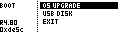
| Entry | Function |
|---|---|
| OS UPGRADE | Opens firmware update mode. |
| USB DISK | Opens the SD card as a USB disk where supported. |
| EXIT | Exit the menu and boot normally. |
On MegaCommand and MegaCMD, OS UPGRADE uses USB Serial mode. On TBD hardware, it opens the board's firmware updater.
USB DISK is available on MegaCMD and TBD hardware. The original MegaCommand reports this mode as unavailable.
If DFU MODE appears, it is only useful on MegaCMD hardware. It updates the MegaCMD's internal USB controller and is not for MegaCommand DIY hardware.