Load Page
The Load Page loads grid slots into the active tracks or destination slots.
Open it from the Grid Page with:
[Yes/Enter]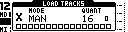
On TBD, Load keeps the Grid Page visible. On MegaCommand and MegaCMD, it opens as a page.
Load Behavior
Loading a slot can restore:
- sequence data
- sound or device state, if
SOUNDis enabled for the slot - length, loop and jump settings
- page-specific state for performance, route, auxiliary and tempo groups
Use the Slot Menu SOUND option to make a slot load sequence-only.
Controls
| Control | Assignment |
|---|---|
| Encoder 1 | Load mode on MegaCommand and MegaCMD: MAN, AUT, QUE. |
| Encoder 2 | Queue length on MegaCommand and MegaCMD; load mode on TBD. Queue length is active only in Queue mode. |
| Encoder 3 | Load quantization on MegaCommand and MegaCMD; queue length on TBD. |
| Encoder 4 | Load quantization. |
| [Trig] keys | Select slots to load. |
| [Scale] | Toggle Grid X / Grid Y while selecting. |
| [Function] | In Manual mode, select a destination offset. |
| [Yes/Enter] | Hold to open group selection; release to load selected groups. |
| [No/Exit] | Cancel Load. |
| [Bank A/B/C] | Shortcut to Manual, Auto or Queue mode. |
Loading Individual Slots
- Open Load.
- Select one or more slots with the [Trig] keys.
- Release the selection to queue or perform the load according to the active load mode.
The visible grid determines which grid the trig keys target. Use [Scale] to switch grids while building a selection.
Group Load
Hold [Yes/Enter] from Load to open LOAD GROUPS.

| Group | Loads |
|---|---|
| 1 | Primary device group. |
| 2 | Secondary device group. |
| 3 | Performance state group. |
| 4 | Auxiliary or route state group. |
| 5 | Tempo/clock state group. |
Use [Trig 1-5] to toggle the desired groups, then release [Yes/Enter] to load them from the current row.
Group selection is also used by bank/trig row loading and program-change row loading.
Load Modes
| Mode | Behavior |
|---|---|
MAN |
Load the selected slots at the next transition interval. Existing queues for matching slots are cleared. |
AUT |
Load the selected slots, then follow each slot's LOOP and JUMP settings when its loop count is reached. |
QUE |
Add the selected row or slot to that column's queue. Queued entries repeat in order. |
Each slot/column has its own chain state. This allows one track to follow an automatic chain, another to play a queued set of rows, and another to remain static.
Queue Length Override
In Queue mode, the queue-length encoder sets a length override. Use Encoder 2 on MegaCommand/MegaCMD, or Encoder 3 on TBD.
| Value | Behavior |
|---|---|
- |
Use the queued slot's stored length. |
| 2-64 | Override the queued length in steps. Normal encoder turns step through powers of two; holding the encoder button while turning allows intermediate values such as 3, 5 or 6. |
This is useful when a short track should loop for a longer phrase, or when a group of slots should advance together despite having different stored lengths.
Quantization
Load quantization sets the transition interval for the selected load.
| Value | Meaning |
|---|---|
- |
Load at the destination track's next transition point, based on its current length and speed. |
| 2-64 | Load at the next matching step interval. Normal encoder turns step through powers of two; holding the encoder button allows intermediate values. |
Use quantization to keep manual, auto and queue loads aligned with the phrase length.
Destination Offset
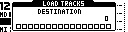
In Manual mode, hold [Function] from Load to choose a destination offset.
- Hold [Function].
- Press a [Trig] key to choose the destination slot.
- Release the selection to load the selected source slot or range into the chosen destination area.
Destination offset is ignored outside Manual mode.
Bank And Trig Row Loading
From the Grid Page, [Bank] + [Trig] loads rows by bank position.
| Gesture | Result |
|---|---|
| First row selected | Jump to or load that row. It uses Auto only if Auto was already active; otherwise it uses Manual. |
| Additional rows selected | Queue the selected rows as a row chain. |
After the row selection is applied, MCL restores the load mode that was active before the bank/trig gesture.
Track Levels During Load
For Machinedrum tracks, MCL does not continuously transmit track LEV while the sequencer is running. This lets the performer use the Machinedrum level control for live fades during and after slot loads.
Use CONFIG > MACHINEDRUM > NORMALIZE to keep saved track loudness predictable when loading between slots.