Chromatic Page
The Chromatic Page plays and records pitched notes for the current sequencer track. It can target the primary device, such as Machinedrum or TBD, or the secondary/external MIDI-style tracks.
Open it from Page Select with:
[Bank Group] + [Trig 8]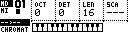
Controls
| Control | Assignment |
|---|---|
| Encoder 1 | Octave offset (OCT). |
| Encoder 2 | Fine tune / detune (DET). |
| Encoder 3 | Track length (LEN) or poly length (PLEN) when a poly group is active. |
| Encoder 4 | Scale (SCA). |
| [Trig] keys | Play the on-screen keyboard or select tracks while the Track Menu is open. |
| [Scale] | Toggle primary/secondary device target where available. |
| [Global] | Hold for the Track Menu. |
| [Rec] + [Play] | Start live recording. |
Track Menu CLEAR |
Clear the current track or active poly group where applicable; repeat CLEAR to undo while the undo state is active. |
The bottom of the display shows a keyboard view. Played notes and arpeggiator notes are reflected there.
Parameters
| Parameter | Function |
|---|---|
OCT |
Moves played notes by octaves. |
DET |
Fine tune / detune for the active pitched track where supported. |
LEN |
Length of the active sequencer track. |
PLEN |
Length shown when the active primary track belongs to a poly group. |
SCA |
Musical scale mapping for incoming and trig-key notes. |
The scale setting maps incoming notes to the selected scale. Notes shifted outside the playable range are skipped rather than wrapped into an unexpected low pitch.
Device Selection
Press [Scale] to switch the Chromatic Page between primary and secondary targets where both are available.
| Target | Typical use |
|---|---|
| Primary | Machinedrum, TBD or another primary step-capable device. |
| Secondary | External MIDI-style tracks, A4/MNM/generic MIDI or TBD secondary tracks. |
When the Track Menu is open, the trig keys can select or mute secondary tracks.
| Trig keys | Function |
|---|---|
| [Trig 1-6] | Select external MIDI-style tracks 1-6. |
| [Trig 9-14] | Toggle mutes for external MIDI-style tracks 1-6. |
Track Menu Entries
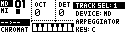
Hold [Global] to open the Track Menu.
| Entry | Function |
|---|---|
DEVICE |
Select primary or secondary target. |
TRACK SEL |
Select the active track. |
SPEED |
Set track playback speed. |
COPY, CLEAR, PASTE |
Copy, clear or paste the active track. |
SHIFT, REVERSE, TRAN |
Shift, reverse or transpose the active track. |
ARPEGGIATOR |
Open the per-track Arpeggiator Page. |
KEY |
Shift the scale root by semitones. |
POLYPHONY |
Open the Polyphony Page. |
SOUND |
Open sound selection where the primary device supports it. |
LENGTH |
Set track length. |
CHANNEL |
Set the MIDI channel for secondary/external tracks. |
QUANT |
Toggle live record and arpeggiator quantization. |
Controller Input Setup
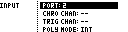
Chromatic input is configured from:
CONFIG > MIDI > CONTROLLER > INPUT| Setting | Function |
|---|---|
PORT |
Selects the controller input port: 2, USB, or 2 + USB. |
CHRO CHAN |
Channel for chromatic playing. Use -- or 1..16. |
TRIG CHAN |
Channel for external drum-pad triggering of tracks. Use -- or 1..16. |
POLY MODE |
INT uses internal/chromatic input only. INT+EXT also lets external controller input play poly voice groups. |
The external MIDI channel used for a poly voice group comes from that group's channel assignment on the Polyphony Page.
Recording Notes
Start live recording with:
[Rec] + [Play]While recording, played notes are written into the active track or into the selected poly voice tracks. The Track Menu QUANT setting controls whether note placement is quantized.
Machinedrum And TBD Pitch
For Machinedrum-style tracks, the current machine must support pitched playback for chromatic playing to be useful. MIDI machines are handled as MIDI voice tracks. TBD tracks use the note/pitch target exposed by the active TBD sound.
For melodic Machinedrum machines, the track's pitch parameter is mapped to notes. Tonal machine tuning uses the newer equal-temperament-style mapping; default tuning keeps the legacy machine-specific behavior.