Polyphony Page
The Polyphony Page assigns primary tracks to MIDI channel groups. Tracks in the same group act as voices for one multi-timbral polyphonic part.
Open it from the Chromatic Page Track Menu:
[Global] > POLYPHONY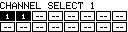
On hardware with panel buttons, the Chromatic Page can also open Polyphony with the [Save/No] + [Load/Yes] button chord.
Core Idea
Each primary track can be assigned to:
--for no poly group- MIDI channel group
1..16
Tracks sharing the same channel group form a voice pool. Different channel groups can exist at the same time, so the Machinedrum or other supported primary device can behave as multiple independent polyphonic instruments.
Controls
| Control | Assignment |
|---|---|
| Encoder 1 | Select the channel group for held tracks. |
| [Trig] keys | Hold one or more tracks to assign. |
| [Clear] | Assign held tracks to -- / off. |
| [Yes/Enter] or [No/Exit] | Save group assignments and return. |
| Panel buttons 2/3 | Cycle the selected group down/up where available. |
The page shows all 16 primary tracks. Each cell displays either -- or the assigned channel group.
Assigning Voices
- Open the Polyphony Page.
- Hold the [Trig] keys for the tracks that should act as voices.
- Turn Encoder 1 to choose a channel group from
1..16. - Release the tracks.
- Press [Yes/Enter] or [No/Exit] to save and return.
To remove tracks from polyphonic play, hold them and choose --, or press [Clear].
Playing A Group
When the active Chromatic track belongs to a group, the Chromatic Page shows PLY and uses the group's voice pool.
| Input | Behavior |
|---|---|
| Internal Chromatic keyboard | Plays the selected track's group. |
External controller with POLY MODE = INT+EXT |
Plays the group whose channel matches the incoming MIDI channel. |
External MIDI track routed to MD1-MD16 |
Plays the selected Machinedrum track or its polyphonic voice group from the PianoRoll sequencer. |
| MIDI CC 16-39 on a poly channel | Sends Machinedrum parameters 1-24 to every track in that channel group. |
If POLY MODE is INT, external input does not trigger poly groups.
Voice Allocation
MCL chooses an available voice from the active group for each new note. If all voices are busy, the oldest active voice can be reused.
Only tracks that can behave as pitched voices are used. On Machinedrum, this means melodic voice-capable tracks or MIDI machines. On TBD, availability depends on the note/pitch behavior exposed by the active sound.
For the most predictable sound, assign tracks with the same or compatible machine/sound type to the same group.
Parameter Linking
When a track belongs to a poly group, compatible parameter changes are linked across the other tracks in the group.
| Parameter type | Link behavior |
|---|---|
| Shared synthesis parameters | Linked when the destination voice uses a compatible machine/sound type. |
| Later Machinedrum parameter pages | Linked where the parameter can safely apply across voices. |
| Mute parameters | Not poly-linked. |
MCL shows a POLY LINK popup when a linked parameter update is sent outside the Mixer Page.
Storage
Poly group assignments are saved when you leave the Polyphony Page with [Yes/Enter] or [No/Exit].
To recall the current route and polyphony setup from the grid, save the RT slot with the row.
Relationship To POLY MODE
The Polyphony Page assigns tracks to MIDI channel groups. POLY MODE only controls whether those groups also listen to an external controller.
POLY MODE is set from:
CONFIG > MIDI > CONTROLLER > INPUT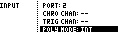
| Value | Behavior |
|---|---|
INT |
Poly groups respond to internal Chromatic playing. |
INT+EXT |
Poly groups also respond to external controller input on matching group channels. |
External MIDI tracks do not use POLY MODE. To drive a Machinedrum voice group from a PianoRoll track, set the Track Menu CHANNEL value past 16 and choose MD1 through MD16.