MIDI Setup
Setup Overview
MCL uses a Grid X / Grid Y device model. After connecting the devices, configure the active device layout from:
CONFIG > MIDI > DEVICESThen configure clock, routing, controller input and program-change behavior from the other MIDI configuration menus.
Machinedrum
For the common Machinedrum setup:
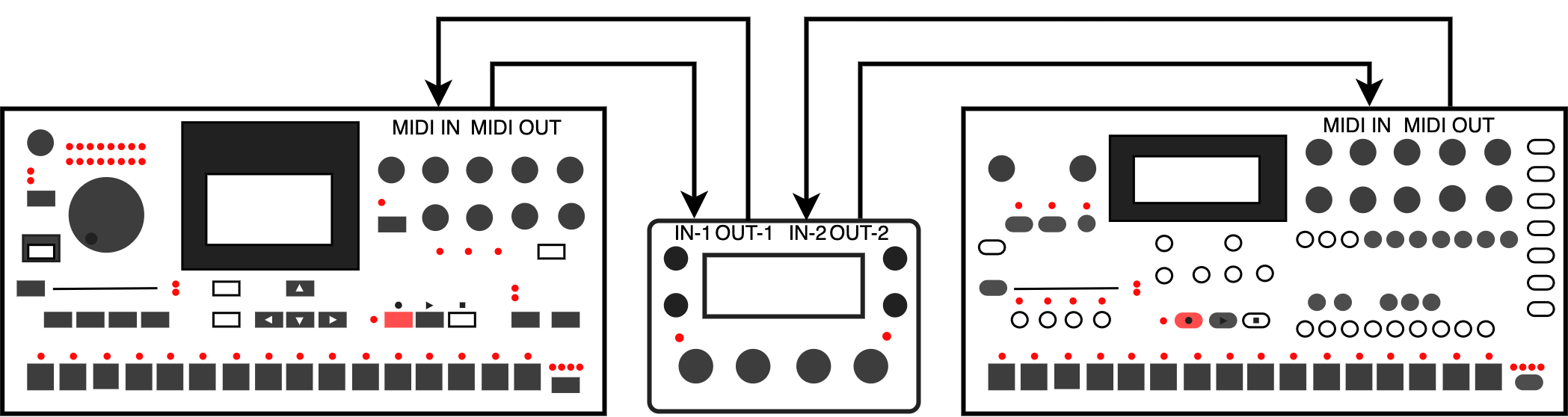
| Connection | Cable |
|---|---|
| Machinedrum MIDI OUT -> MCL MIDI IN 1 | Sends Machinedrum keys, transport, sysex and state changes to MCL. |
| MCL MIDI OUT 1 -> Machinedrum MIDI IN | Sends sequencing, parameter, sysex and control data back to the Machinedrum. |
Recommended configuration:
| Setting | Value |
|---|---|
CONFIG > MIDI > DEVICES > GRID X > DEVICE |
MD |
CONFIG > MIDI > DEVICES > GRID X > PORT |
MIDI 1, meaning MCL MIDI IN 1 / OUT 1 with standard 5-pin MIDI cables |
Upgrade the Machinedrum to OS X.13 before using MCL. For Machinedrum MK1 units, keep Turbo MIDI at 4x or lower.
Secondary Device
For a Monomachine or Analog Four as a secondary device:
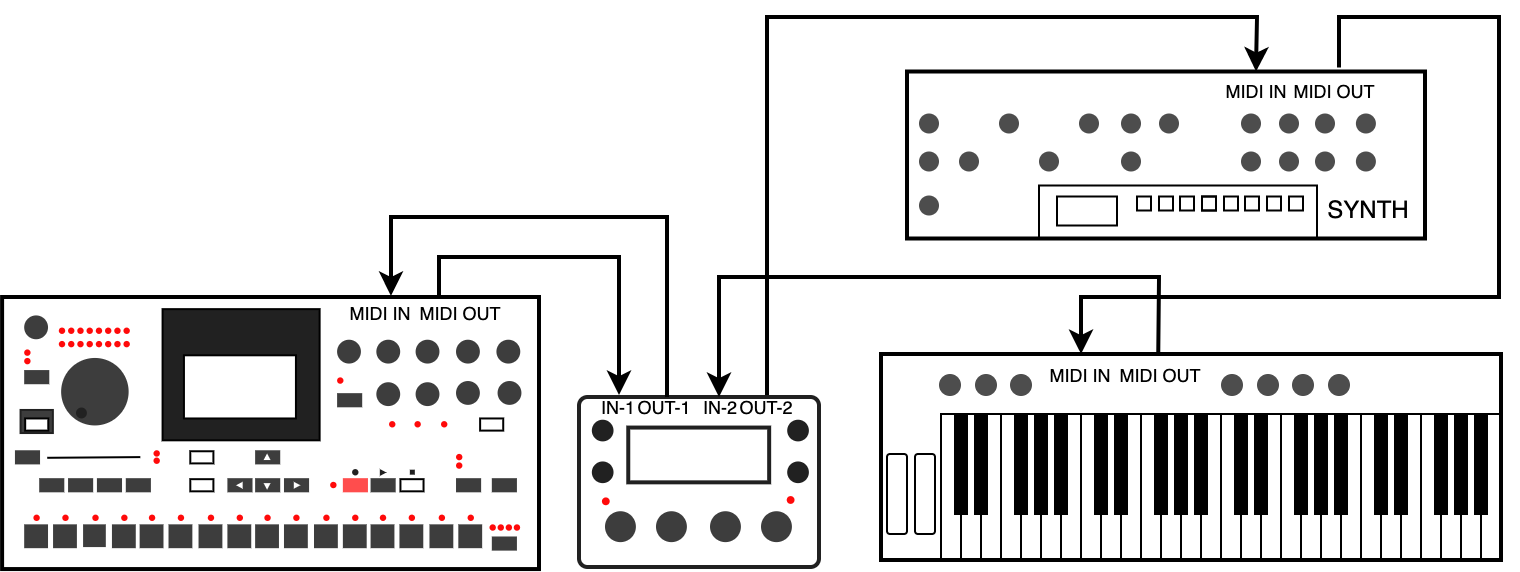
| Connection | Cable |
|---|---|
| Device MIDI OUT -> MCL MIDI IN 2 | Lets MCL receive sysex, transport or performance state where supported. |
| MCL MIDI OUT 2 -> Device MIDI IN | Lets MCL sequence and control the device. |
Recommended configuration:
| Setting | Value |
|---|---|
CONFIG > MIDI > DEVICES > GRID Y > DEVICE |
ELEKT |
CONFIG > MIDI > DEVICES > GRID Y > PORT |
MIDI 2 |
Upgrade the Monomachine to OS X.01 before using MCL.
Generic MIDI Device
For a synth, sampler or drum module using generic MIDI:
| Connection | Cable |
|---|---|
| Controller or keyboard MIDI OUT -> MCL MIDI IN 2 or USB | Optional live input for chromatic play, recording or controller forwarding. |
| MCL MIDI OUT 2 or USB -> External device MIDI IN | Sends notes, automation and program changes from MCL. |
Recommended configuration:
| Setting | Value |
|---|---|
CONFIG > MIDI > DEVICES > GRID Y > DEVICE |
GENER |
CONFIG > MIDI > DEVICES > GRID Y > PORT |
MIDI 2 or USB |
External MIDI tracks can be edited from the Piano Roll and can record or play notes and automation where supported by the selected device.
TBD-16
When running MCL on TBD-16, the external MIDI device setups still work. TBD-16 also provides an internal TBD device on the INT port for controlling the built-in sound engine.
Typical options:
| Grid | Example use |
|---|---|
Grid X = TBD / Port = INT |
Use the internal TBD sound engine as the primary device. |
Grid X = MD / Port = MIDI 1 |
Use a connected Machinedrum as the primary device. |
Grid Y = TBD / Port = INT |
Use the internal TBD sound engine as the secondary device. |
TBD-16 can also use an internal clock source from the MIDI sync menu.
See TBD-16 for TBD-16 panel controls and internal sound-engine sequencing behavior.
Clock and Transport
Configure clock and transport from:
CONFIG > MIDI > SYNCMegaCommand and MegaCMD receive clock from Port 1, Port 2 or USB. TBD can additionally use the internal clock source.
Analog Four Manual Settings
When using an Analog Four, configure these settings on the Analog Four itself:
| Analog Four setting | Value |
|---|---|
| MIDI output | MIDI |
| MIDI input | MIDI |
| Keyboard config | EXT |
| Receive notes | On |
| Receive CC/NRPN | On |
| Track MIDI channels | Tracks 1-6 mapped to channels 1-6 |