MIDI Configuration
The MIDI configuration menu controls device assignment, port speed, clock, routing, controller input and program-change behavior.
Open it from:
CONFIG > MIDIThe MIDI menu contains:
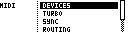
| Entry | Function |
|---|---|
DEVICES |
Assign Grid X and Grid Y devices and ports. |
PORTS / TURBO |
Configure MIDI/USB turbo speed. TBD shows the flattened TURBO menu. MegaCommand and MegaCMD use PORTS with PORT 1, PORT 2 and USB sub-pages. |
SYNC |
Configure clock and transport receive/source plus clock and transport send. |
ROUTING |
Forward non-realtime MIDI between ports. |
CONTROLLER |
Configure live input and output forwarding. |
PROGRAM |
Configure program-change driven loading. |
Changes are applied when leaving the relevant menu.
Devices
The device setup menu assigns the device and port used by Grid X and Grid Y.
CONFIG > MIDI > DEVICES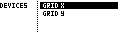
| Entry | Function |
|---|---|
GRID X |
Primary grid device and port. |
GRID Y |
Secondary grid device and port. |
MegaCommand / MegaCMD Device Options
| Grid | Device options | Port options |
|---|---|---|
| Grid X | OFF, MD |
MIDI 1, USB |
| Grid Y | GENER, ELEKT, OFF |
MIDI 2, USB |
TBD Device Options
| Grid | Device options | Port options |
|---|---|---|
| Grid X | OFF, MD, TBD |
INT, MIDI 1, USB |
| Grid Y | GENER, ELEKT, TBD, OFF |
INT, MIDI 2, USB |
Use OFF for an unused grid. Changing device assignments affects how projects map stored grid slots to devices.
Ports and Turbo
MegaCommand and MegaCMD use:
CONFIG > MIDI > PORTS > PORT 1
CONFIG > MIDI > PORTS > PORT 2
CONFIG > MIDI > PORTS > USB
Each port has a TURBO setting.
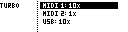
| Hardware | Turbo options |
|---|---|
| MegaCommand / MegaCMD | 1x, 2x, 4x, 8x |
| TBD and desktop | 1x, 2x, 4x, 6.7x, 8x, 10x |
TBD shows the turbo settings directly under:
CONFIG > MIDI > TURBOFor Machinedrum MK1 units, use 4x or lower.
Sync
CONFIG > MIDI > SYNC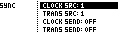
| Entry | MegaCommand / MegaCMD | TBD |
|---|---|---|
| Clock receive/source | CLOCK RECV: 1, 2, USB |
CLOCK SRC: 1, 2, USB, INT |
| Transport receive/source | TRANS RECV: 1, 2, USB |
TRANS SRC: 1, 2, USB, INT |
| Clock send | CLOCK SEND: OFF, 2, USB, 2 + USB |
Same send options |
| Transport send | TRANS SEND: OFF, 2, USB, 2 + USB |
Same send options |
Use the same receive/source for clock and transport unless transport intentionally comes from a different source.
On TBD, the send settings choose external MIDI/USB ports. The internal TBD connection is handled automatically when TBD is assigned to either grid.
Routing
CONFIG > MIDI > ROUTING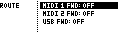
Routing forwards non-realtime MIDI traffic between ports.
| Entry | Function |
|---|---|
MIDI 1 FWD |
Forward data received on MIDI 1 to OFF, 2, USB, or 2 + USB. |
MIDI 2 FWD |
Forward data received on MIDI 2 to OFF, 1, USB, or 1 + USB. |
USB FWD |
Forward data received on USB to OFF, 1, 2, or 1 + 2. |
The old CC LOOP routing entry is not exposed.
Controller Input
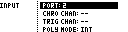
CONFIG > MIDI > CONTROLLER > INPUTController input is used for chromatic play, drum triggering, polyphonic input and live recording.
| Entry | Function |
|---|---|
PORT |
Selects the controller input port: 2, USB, or 2 + USB. |
CHRO CHAN |
MIDI channel for chromatic play: -- or 1..16. |
TRIG CHAN |
MIDI channel for drum-pad triggering: -- or 1..16. |
POLY MODE |
INT uses internal note data only; INT+EXT also responds to external controller input. |
Controller Output
CONFIG > MIDI > CONTROLLER > OUTPUT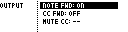
| Entry | Function |
|---|---|
NOTE FWD |
Forward controller note input to the configured secondary-device output when enabled. |
CC FWD |
Forward controller CC input to the configured secondary-device output when enabled. |
MUTE CC |
Selects the CC used to send or receive external track mute state, or -- to disable it. |
Program Change
CONFIG > MIDI > PROGRAM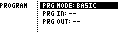
| Entry | Function |
|---|---|
PRG MODE |
BASIC or ADV. |
PRG IN |
Program-change receive channel: --, 1..16, or OMNI. |
PRG OUT |
Program-change transmit channel: -- or 1..16. |
BASIC mode loads a full row according to the active load-page mode and group selection.
ADV mode sets the row used for incoming note-triggered slot loads. Notes from C4 upward select slots to load from the current or most recently selected row.
MCL cannot load slots instantaneously; plan for at least one bar of lead time when driving loads from external program changes or notes.