Route Page
The Route Page is used to direct the audio of a specific MD track to a selected output.
Routing configuration can be either stored or recalled by saving or loading to the corresponding Auxiliary track Route slot.
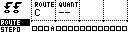
The Route page can be accessed by pressing [Bank Group] and [Trig 4].
| Control | Assignment |
|---|---|
| Encoder 1 | Output Selection |
| Encoder 2 | Quantization |
| Encoder 3 | -- |
| Encoder 4 | -- |
| Save / No | -- |
| Page | PageSelect |
| Load / Yes | -- |
| Shift | -- |
Encoder 1 can be used to select the audio output destination. The destination can be one of MD's external outputs C, D, E, F.
The MD's [Trig] keys are used to toggle the output of selected tracks, between Main Outputs and the chosen external output.
Quantization Rules
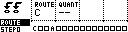
The quantization rules specify the timing of the routing changes so that they are in sync with the sequencers.
The minimum quantization value is 2 steps. Quantization values can be changed by adjusting the ”Q:” parameter, and increase in powers of 2. Holding down the encoder button will step increment the quantization value.
- --: No quantization.
- 02: Apply route toggles on the next 2-step boundary.
- 04: Apply route toggles on the next 4-step boundary.
- 08: Apply route toggles on the next 8-step boundary.
- 16: Apply route toggles on the next 16-step boundary.
- 32: Apply route toggles on the next 32-step boundary.
- 64: Apply route toggles on the next 64-step boundary.
Grid Saving or Loading
The routing configuration can be saved and loaded from Grid Y's RT route slot, along with per-track PTC group assignments. Save the RT slot, or use the route group on the Save and Load pages, when route edits should be recalled later.
For more information on slot positions and their corresponding tracks see "Sequencer: Saving and Loading".