FX Delay Page
Controls the master FX Delay settings.
To enter the FX Delay Page: hold [Bank Group], then press [Trig 13].
Each parameter of the MD's delay effect can be controlled. Four are displayed at once on screen. On MD-style controls, hold [No] and press [Left] to open the Delay/Echo page from either FX page. If Delay/Echo is already visible, the same shortcut switches between its two parameter groups. Release [No] to return to the Mixer Page.
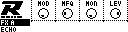
FX A
| Control | Assignment |
|---|---|
| Encoder 1 | Modulation (MOD) |
| Encoder 2 | Modulation Frequency (MFQ) |
| Encoder 3 | Mono (MON) |
| Encoder 4 | Level (LEV) |
FX B
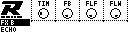
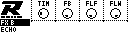
| Control | Assignment |
|---|---|
| Encoder 1 | Delay Time (TIM) |
| Encoder 2 | Delay Feedback (FB) |
| Encoder 3 | Filter Frequency (FLF) |
| Encoder 4 | Filter Width (FLW) |