Save Page
The Save Page writes the current track or group state into grid slots.
Open it from the Grid Page with:
[Function] + [Yes/Enter]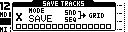
On TBD, Save keeps the Grid Page visible. On MegaCommand and MegaCMD, it opens as a page.
Stored Data
Save stores sequence data and any supported sound or state data for the selected slots.
| Source | Typical saved data |
|---|---|
| Device tracks | Sequence data, sound/device state, locks, length and link settings. |
| Performance group | Performance controller and state data. |
| Auxiliary/route group | Route or page-specific auxiliary state. |
| Tempo group | Tempo/clock-related state. |
The actual saved data depends on the selected device and slot type.
Controls
| Control | Assignment |
|---|---|
| [Trig] keys | Select the slots to save. |
| [Scale] | Toggle Grid X / Grid Y while selecting. |
| [Yes/Enter] | Hold to open group selection; release to save selected groups. |
| [No/Exit] | Cancel Save. |
Saving Individual Slots
- Open Save.
- Select one or more slots with the [Trig] keys.
- Release the selection to save the corresponding tracks to the current row.
The visible grid determines whether the trig keys target Grid X or Grid Y. Use [Scale] to switch grids while building a selection.
Saving Across Both Grids
To save tracks from both grids in one operation:
- Open Save.
- Select slots on the first grid.
- Use [Scale] to switch to the other grid.
- Select additional slots.
- Release the selection to save all selected slots.
Group Save
Hold [Yes/Enter] from Save to open SAVE GROUPS.
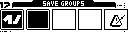
The group selector uses the first five trig keys.
| Group | Saves |
|---|---|
| 1 | Primary device group. |
| 2 | Secondary device group. |
| 3 | Performance state group. |
| 4 | Auxiliary or route state group. |
| 5 | Tempo/clock state group. |
Use [Trig 1-5] to toggle the desired groups, then release [Yes/Enter] to save them.
The group icons follow the configured devices. A classic Machinedrum project may show MD-related groups; a TBD or generic MIDI project may show different device icons.
Row Names
When a group or row-level save writes active slot data, the row name is associated with the row and shared across grids. Rename rows from the Slot Menu.
Saving And Projects
Saving slots updates the current project's grid files. A separate full-project save is not required after writing the relevant slots.
Supported project configuration is stored in the project header when system configuration is written. CONFIG > SYSTEM > PROJ CFG controls whether those stored settings are applied when the project loads. The Machinedrum SAMPLEBANK link is part of project configuration and loads with the project.